Use case
Watch a Shopify Store for New Products
Catch every product a Shopify store adds or removes between runs — for trend-spotting and assortment tracking.
Say you write a market brief on athleisure brands, or you buy for a shop that follows what the big DTC names launch. The interesting event is a product appearing — a new colourway, a category the brand has never sold before, a quiet line extension that shows up two weeks before anyone announces it. The reverse is just as informative: a product that vanishes from the catalog is a brand telling you something it would never put in a press release. Neither event announces itself. New-arrivals pages are curated, and “curated” means the brand decides what you see, and when.
The manual way, and what it costs
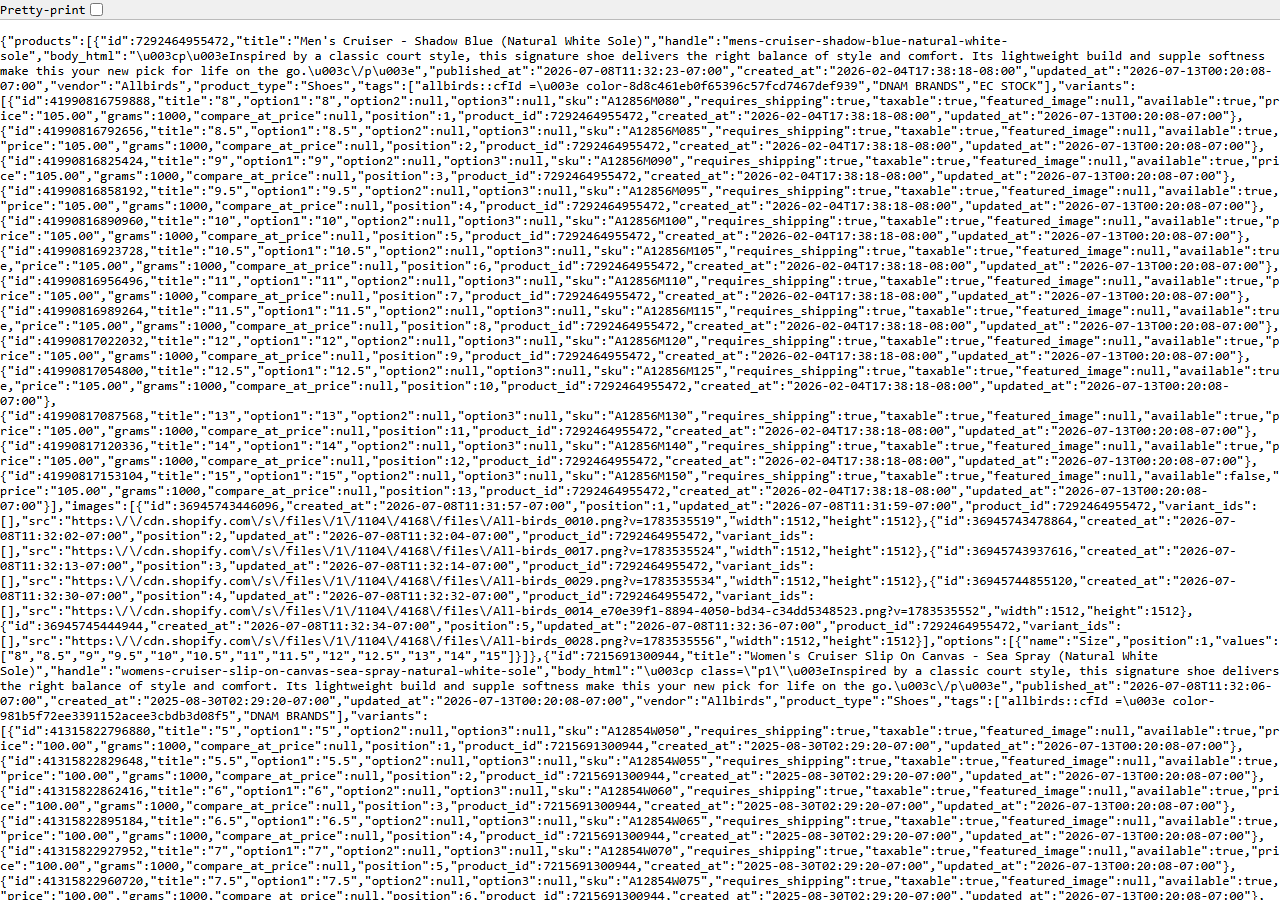
/products.json — the full catalog, not the curated new-arrivals page.The uncurated version is public. /products.json on any Shopify store lists the catalog the
storefront is actually serving — the screenshot above is one, straight from a live store, no login
involved. Read it and you’re looking past the homepage at the whole assortment.
You could keep a copy each week and compare. For one store, once a month, that’s a perfectly reasonable habit and you should just do it — save the file, diff it against last month’s, done. It falls apart when you want it weekly, across a set of brands, and when you care about removals as much as additions: a removal isn’t visible anywhere on the site at all, and the only way to see one is to notice something that used to be in the file and isn’t. Doing that by eye through a few thousand lines of JSON per store is exactly the kind of work nobody keeps up for a quarter.
The faster way
Shopify Price & Stock Change Tracker reads the same public endpoint on a schedule, keeps a snapshot of the catalog, and returns a row for every product added and every product removed since the previous run.
{
  "domains": [
    "gymshark.com"
  ]
}
One store, no filters — additions and removals are always reported, so there is nothing to configure
for this job. (minPriceChangePercent only suppresses small price moves; if you don’t care about
price at all, filter it out on change_type when you read the dataset.) The first run is a baseline:
it records the catalog as it stands, costs nothing, and reports no changes, because there’s nothing
to compare it against yet. Add the rest of the brands to domains when you’re ready — each store
keeps its own snapshot, so a new one simply starts its own baseline. Then schedule it: weekly is
enough for assortment work, daily if you’re trying to be first.
What comes back
{
  "domain": "allbirds.com",
  "change_type": "price_decreased",
  "product_title": "Wool Runner",
  "product_handle": "wool-runner",
  "product_id": 100,
  "variant_sku": "WR-9-GREY",
  "variant_id": 1001,
  "old_price": 110.0,
  "new_price": 88.0,
  "price_change_pct": -20.0,
  "old_available": null,
  "new_available": null,
  "tracked_products": null,
  "changes_found": null,
  "detected_at": "2026-02-01T00:00:00+00:00",
  "source_url": "https://allbirds.com"
}| Field | Example value | Meaning |
|---|---|---|
domain | allbirds.com | Store domain monitored |
change_type | price_decreased | price_increased, price_decreased, back_in_stock, out_of_stock, new_product, removed_product (or a free baseline/snapshot/unavailable marker) |
product_title / product_handle | — | The product that changed |
variant_sku / variant_id | — | The specific variant, for price/availability changes |
old_price / new_price | — | Price before and after the change |
price_change_pct | -20.0 | Signed percentage price change |
The row above is a price move, since that’s the sample the actor ships. Your rows look the same but
say new_product or removed_product in change_type — that’s the field you filter on, and it’s
the one that closes the loop. A new_product row carries the product_title and product_handle
(the handle is the URL slug, so store.com/products/<handle> takes you straight to the page),
new_price set to the cheapest variant it launched at, and detected_at — the date you can defend
in a brief. A removed_product row carries the title, the handle, and old_price: what it used to
cost before it disappeared.
What you’d do with it
Filter the dataset to new_product and removed_product, export to CSV, and let it accumulate. A
few months of that is an assortment timeline — what a brand launched, what it dropped, and when —
which is the thing you can’t buy back later, because a store’s catalog only ever shows you today.
Build the handle into a URL column and every row becomes one click to the product page for whoever
has to write the actual brief.
Worth knowing
Public storefront only. You’ll see that a product appeared; you will not see how it sold. Real
inventory counts, sales, revenue and orders are Admin-API-only and never returned here — no scraper
gets them. “New” also means new to the catalog since the previous run, not new to the world: a
product that was hidden and then re-published looks the same as a fresh launch, and a store that
prunes and re-adds a seasonal line will show removals and additions accordingly. Diffing needs a
prior run, so the first run for each store is a baseline with no changes. Roughly 10–15% of stores
disable /products.json; those return an unavailable marker. If a storefront refuses its custom domain, the actor
retries it at the store’s <handle>.myshopify.com origin automatically.
Run it yourself: How to run Shopify Price & Stock Change Tracker walks the whole thing step by step.
The same runs also answer the pricing question — Monitor a Competitor’s Shopify Prices reads them for discounts and increases instead. And when a launch makes you curious about how a brand’s store is actually built, Shopify App & Theme Detector — Store Audit & Gap Finder audits its apps, theme and stack in one pass.
Last updated 2026-07-13