Use case
Verify a New Mexico Contractor by License Number
Confirm NM CID contractor licence numbers — status, expiry and the registered business name — from the official New Mexico registry, one or a whole batch per run.
Say you underwrite contractor liability policies, and an application has just landed with a New Mexico license number typed into a form field. Before it goes any further, that number has to be real: it has to exist in the state registry, it has to be attached to the business named on the application, and it has to still be active on the day you bind. The number on the form is a claim. Your job is to turn it into a fact, and to keep a record of having done so.
One application, that’s a two-minute job. The problem is that applications don’t arrive one at a time, and each one has to be checked again at renewal.
The manual way, and what it costs
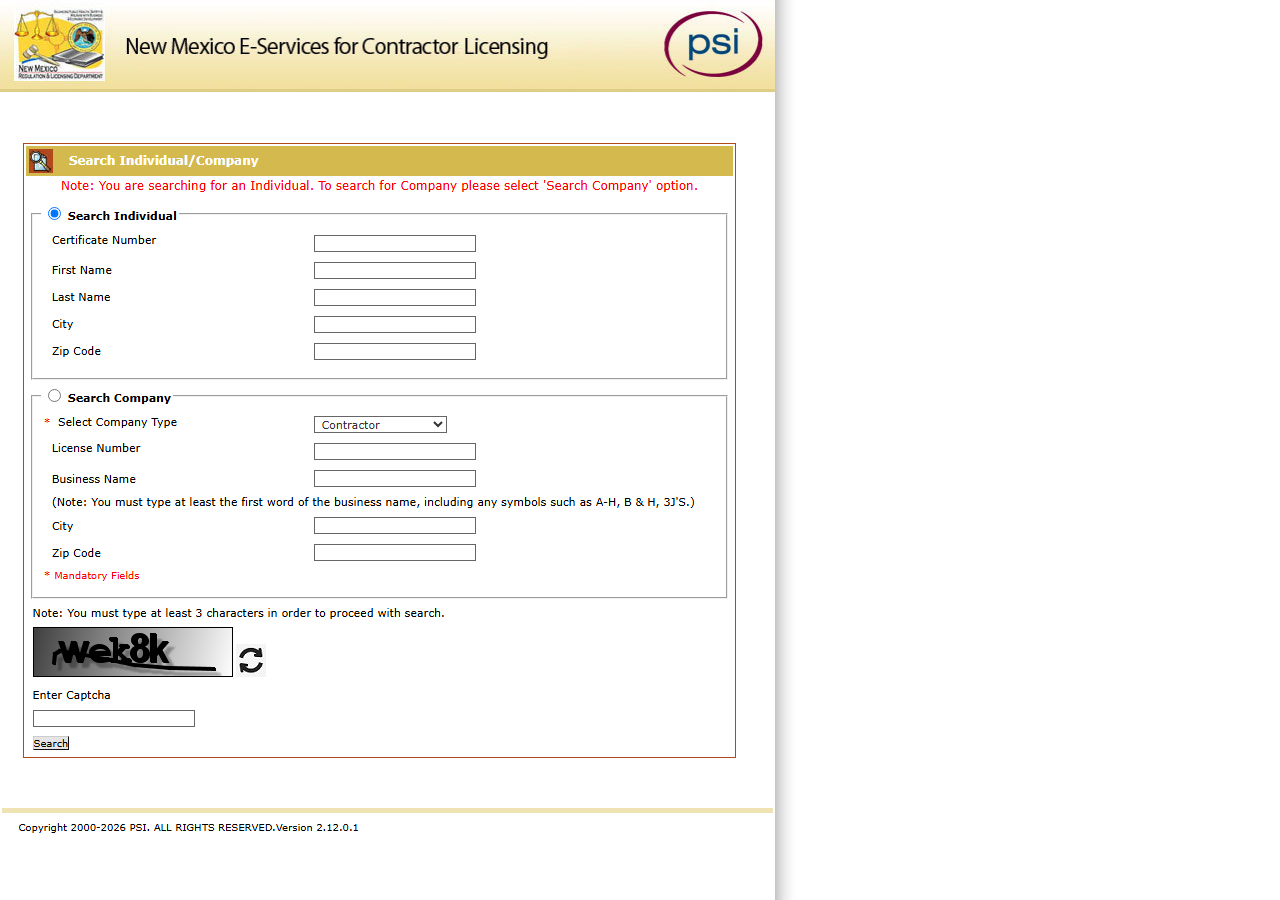
The registry is public and free, and this is what it looks like. New Mexico’s contractor licensing e-services are hosted by PSI, not by the state directly. You pick Search Company, set the company type to Contractor, type the license number into the box — and then you deal with the thing at the bottom of the form: a smeared, struck-through word rendered as an image, with a box underneath it labelled Enter Captcha. Read it, type it, press Search. Get it wrong and the portal throws the search away and gives you a fresh word to squint at.
If you have one license number to check and you need today’s answer, go and do exactly that. It is free, it is live, it takes a minute, and nothing on this page will do it better. Genuinely — close the tab.
Where it stops being reasonable is repetition. There is no export on that results page, so every verification ends with you copy-pasting a status and an expiry date into whatever system of record you keep. There is no way to schedule it, so “recheck this contractor before renewal” is a calendar reminder and a manual re-run, not a job. And every search — including the ones that come back empty — goes through the form again. Fifty policies in the book means fifty searches, and fifty again next quarter.
The faster way
New Mexico Contractor License Lookup & List Scraper (NM CID) checks numbers against a monthly copy of the whole registry, every licence in every status — one number or the whole book in one run, with no CAPTCHA.
{
  "licenseNumber": "396966"
}
That’s the whole input. licenseNumber is an exact match, so you’re asking the registry the same
closed question the underwriting file asks: does license 396966 exist, and what is its state? You
deliberately leave businessName empty — you are not searching for a company, you are testing a
number, and adding a name filter would only let a typo in the applicant’s spelling hide a license
that is really there. The name comes back from the registry, which is the point: you want the
state to tell you who owns that number, not to confirm what the applicant already told you.
For the whole book, put every number in licenseNumbers instead and run it once:
{
  "licenseNumbers": ["396966", "<the next number>", "<and the next>"]
}
Each number gets its own row if it exists. A number that matches nothing adds no row, so compare the
numbers you sent with the license_number column you got back — a missing one is a number the
registry doesn’t have. Cancelled, revoked and suspended licences are in the registry too, so a
number that was real comes back with that status rather than vanishing.
What comes back
{
  "state": "NM",
  "license_number": "396966",
  "business_name": "ADAMS & SMITH, INC.",
  "person_name": null,
  "license_type": "Contractor",
  "status": "Active",
  "issue_date": null,
  "expiration_date": "12/31/2027",
  "city": "LINDON",
  "county": null,
  "address": "1380 W CENTER ST",
  "zip_code": "84042",
  "phone": null,
  "bond_amount": null,
  "bond_company": null,
  "insurance_company": null,
  "matched_by": "license_number",
  "source_url": "https://public.psiexams.com/search.jsp"
}| Field | Example value | Meaning |
|---|---|---|
state | NM | Always ‘NM’ for this actor |
license_number | 396966 | NM CID contractor license number |
status | Active | License status (e.g. Active, Cancelled) |
license_type | Contractor | Always ‘Contractor’ (NM CID’s contractor company category) |
business_name | ADAMS & SMITH, INC. | Licensed business/company name |
address | 1380 W CENTER ST | Principal place of business street address |
Three columns close the file, and the run log dates it. status tells you the license is Active
rather than cancelled. expiration_date tells you whether it will still be active on the day you
bind, and gives you the date to re-check against. business_name is the one that catches the
mismatch — if the registry says ADAMS & SMITH, INC. and the application says something else, you
have found a real problem, and you found it before signing rather than at claim time. And
the sweep date in the run log is the date the registry said all that, which is what goes in the file note.
The address fields are worth a glance too. city and zip_code come back as filed, which means
they are sometimes out of state — the row above is a New Mexico license held by a company with a
Utah address. That’s a fact about the licensee, not an error.
What you’d do with it
Run it as the verification step in onboarding: licence numbers in, one row per number out, and each
row lands in the policy record as evidence — status, expiry, the registry’s own spelling of the
business name, and the sweep date. Because it’s an API call rather than a browser session, it also
survives being put on a schedule: re-run the book a month before the earliest expiration_date, or
pull everything expiring in the next 90 days with expiresAfter / expiresBefore, and let the
result flag anything that has gone from Active to something else, instead of trusting a renewal
reminder to make someone open the portal.
Worth knowing
The data is as of the latest monthly sweep, not live. A licence suspended this week still reads
Active until the next sweep, and the run log tells you which sweep you’re looking at.
That’s fine for screening a book and for renewal tracking; for a binding decision on a single licence
where this week matters, confirm that one number on the portal. If the snapshot is ever missing or
more than 45 days old, the run returns one free notice row (notice_type: "blocked") instead of old
data, and charges nothing.
This actor covers the Contractor company-license category on public.psiexams.com and nothing
else. It does not search RLD’s separate Boards and Commissions Division registry, and it does not
cover individual or journeyman licenses — so a tradesperson licensed as a person will not appear here
at all.
It also gives you less than the portal’s own detail view. County, phone, email, bond amount, bond
company, and insurance company all come back null, because the portal’s search results don’t carry
them. If your underwriting file needs a bond figure, this will not supply it. source_url links to
the search portal, not to the specific record, because the portal has no per-record URL — so you
cannot paste a deep link into a file note.
You pay per licence returned, with no per-search fee: $0.004 each from 2026-11-10 (until then $0.01). A number that matches nothing costs nothing.
Run it yourself: How to run New Mexico Contractor License Lookup & List Scraper (NM CID) walks the whole thing step by step.
If the application gave you a company name instead of a number, Find Every New Mexico Contractor License by Name starts from the other end. If the contractor is licensed somewhere other than New Mexico — or you don’t yet know where — Multi-State Contractor & Trade License Lookup checks the same name across several state registries in one run.
Last updated 2026-10-23