Use case
Find Every New Mexico Contractor License by Name
Search the whole NM CID contractor registry by business name and pull every matching licence, in every status, in one run.
Say you run compliance for a construction marketplace, and a contractor has applied to join under the name “Smith”. That’s all you have — a name typed into a signup form, no license number, and a support ticket asking why they haven’t been approved yet.
A name is a slippery thing to verify. It might be filed with the state as SMITH & SONS, or
SMITH BROTHERS CONSTRUCTION, or it might turn up inside a longer name you’d never have guessed at.
The applicant might hold several licenses, or one that lapsed last year and a live one filed under a
slightly different entity. You cannot approve them until you know which licenses actually exist
under that name and which of them are current — and you can’t get there by asking the applicant,
because the whole point is to check what they told you.
The manual way, and what it costs
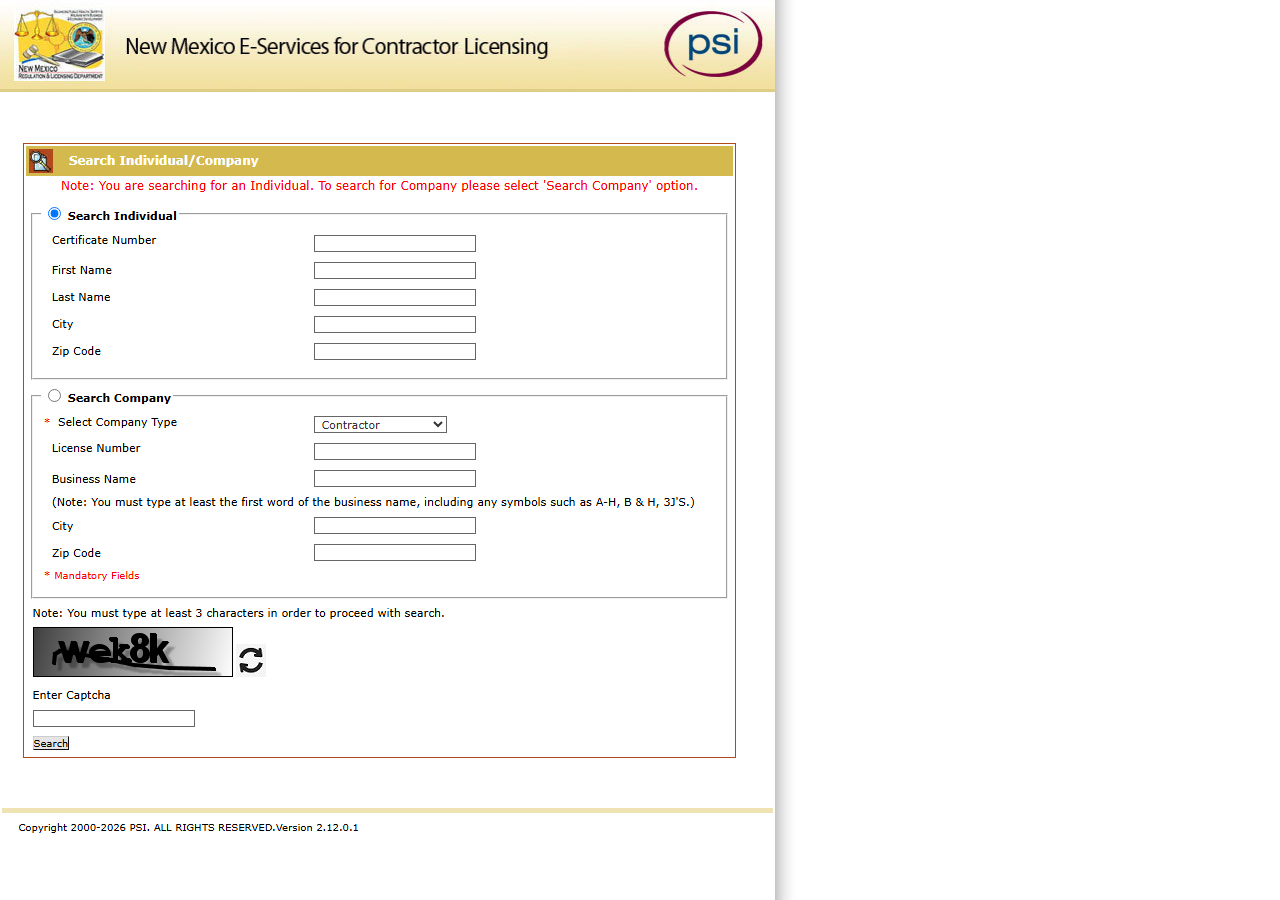
Here’s the free option, in full. New Mexico’s contractor registry is hosted by PSI rather than the
state itself. You select Search Company, choose Contractor as the company type, type Smith
into Business Name — and then, before it will show you a single result, you read the distorted word
in the image at the bottom of the form and type it into the Enter Captcha box. The form is
picky, too: it wants at least three characters, and at least the first word of the business name
including any punctuation, so an entity filed as 3J'S needs the apostrophe or the search goes
nowhere.
One name, once? Do it by hand. It’s free, it’s live, and it’s the same registry. There is no version of this where paying for one lookup makes sense.
The costs show up when the job repeats. The results page has no export, so every approval decision ends in copy-paste. Every search is a fresh trip through the form — including the searches that come back empty, which in name-matching is most of them, because you’re guessing at spellings. A common word stops counting at 300 results. And if your marketplace onboards contractors continuously, “check the state registry” is a task a person does over and over, by reading pictures of words.
The faster way
New Mexico Contractor License Lookup & List Scraper (NM CID) reads a monthly copy of the whole registry — every licence, every status — and hands back every match at once. No CAPTCHA, no page limit.
{
  "businessName": "Smith",
  "maxResults": 500
}
businessName is a contains match, so Smith is deliberately loose — it pulls back every contractor
whose filed name contains it, including ADAMS & SMITH, INC., which nobody would have thought to
search for. That’s the behaviour you want when you’re checking an applicant’s claim rather than
confirming a known company: cast wide, then read the list. Cancelled and revoked licences come back
too, which matters here — an applicant with a revoked licence under a similar name is exactly the
thing you want to see. Add statuses: ["Active"] only if you’ve decided you don’t.
Twenty applicants a week? Put their names in businessNames and run it once. maxResults applies
per name in a batch, so one common name cannot crowd out the rest.
What comes back
{
  "state": "NM",
  "license_number": "396966",
  "business_name": "ADAMS & SMITH, INC.",
  "person_name": null,
  "license_type": "Contractor",
  "status": "Active",
  "issue_date": null,
  "expiration_date": "12/31/2027",
  "city": "LINDON",
  "county": null,
  "address": "1380 W CENTER ST",
  "zip_code": "84042",
  "phone": null,
  "bond_amount": null,
  "bond_company": null,
  "insurance_company": null,
  "matched_by": "business_name",
  "source_url": "https://public.psiexams.com/search.jsp"
}| Field | Example value | Meaning |
|---|---|---|
state | NM | Always ‘NM’ for this actor |
license_number | 396966 | NM CID contractor license number |
status | Active | License status (e.g. Active, Cancelled) |
license_type | Contractor | Always ‘Contractor’ (NM CID’s contractor company category) |
business_name | ADAMS & SMITH, INC. | Licensed business/company name |
address | 1380 W CENTER ST | Principal place of business street address |
business_name is what resolves the ambiguity you started with — it’s the state’s own spelling, so
you can finally see whether your applicant is SMITH BROTHERS or the SMITH buried inside
ADAMS & SMITH, INC., and whether they hold one license or several. license_number is what you
store afterwards, because it’s the identifier that survives a rebrand. status and
expiration_date are what turn a match into an approval: a name that exists in the registry but
whose license expired in 2023 is a rejection, not a match. Rows are deduplicated by license number,
so a licence that matches two names in a batch appears once.
What you’d do with it
Wire it into the signup flow. The name from the application goes in, the matching licenses come back
as rows, and a human sees a short list with statuses and expiry dates attached instead of a portal
tab and a CAPTCHA. Where there is exactly one active match, the approval is mechanical. Where there
are three, or zero, or one that expired, you have a specific question to put to the applicant — and
you have the license_number to key their record on from then on, so the next check is an
exact-match lookup rather than another guess at a spelling.
Worth knowing
The data is as of the latest monthly sweep, not live, and the run log states which sweep. A licence that changed status this week shows its status on that date. For an approval that hinges on today’s status, use this to find the licence, then confirm that one number on the portal. If the snapshot is ever missing or more than 45 days old, the run returns one free notice row instead of old data.
The match is against the name as the state filed it, so type a short, distinctive fragment rather than the full name off an invoice.
Coverage stops at the Contractor company-license category on public.psiexams.com. RLD’s
separate Boards and Commissions Division search isn’t included, and neither are individual or
journeyman licenses — so an applicant licensed as a person rather than a company won’t appear here at
all, and a 0 results run is not proof they’re unlicensed.
The rows are also thinner than the portal’s detail view. County, phone, email, bond, and insurance
come back null because the portal’s search results don’t carry them, and source_url points at the
search portal because the portal has no per-record URL.
You pay per licence returned: $0.004 each from 2026-11-10 (until then $0.01). A name that matches nothing costs nothing; there is no per-search fee.
Run it yourself: How to run New Mexico Contractor License Lookup & List Scraper (NM CID) walks the whole thing step by step.
Once the applicant hands over an actual number, Verify a New Mexico Contractor by License Number is the exact-match version of this check. If you onboard contractors in more than one state, South Carolina Contractor License Lookup & Verify (SC LLR) does the same job against South Carolina’s registry, searching it live.
Last updated 2026-10-23