Use case
List New Mexico Contractors in a City
Pull every licensed NM CID contractor in a city — all 3,754 Active ones in Albuquerque, say — from the official registry, in one run.
Say you’re putting a job out to bid in Albuquerque and you need contractors to invite — but only ones the state actually licenses. You have a referral list from a previous project, a few names off a directory site, and no confidence that any of them are current. What you want is the list of licensed contractors in that city, with a status and an expiry date next to each name, so the invite list is defensible before you send it.
The state registry has exactly that. It just does not want to give it to you in a usable shape.
The manual way, and what it costs
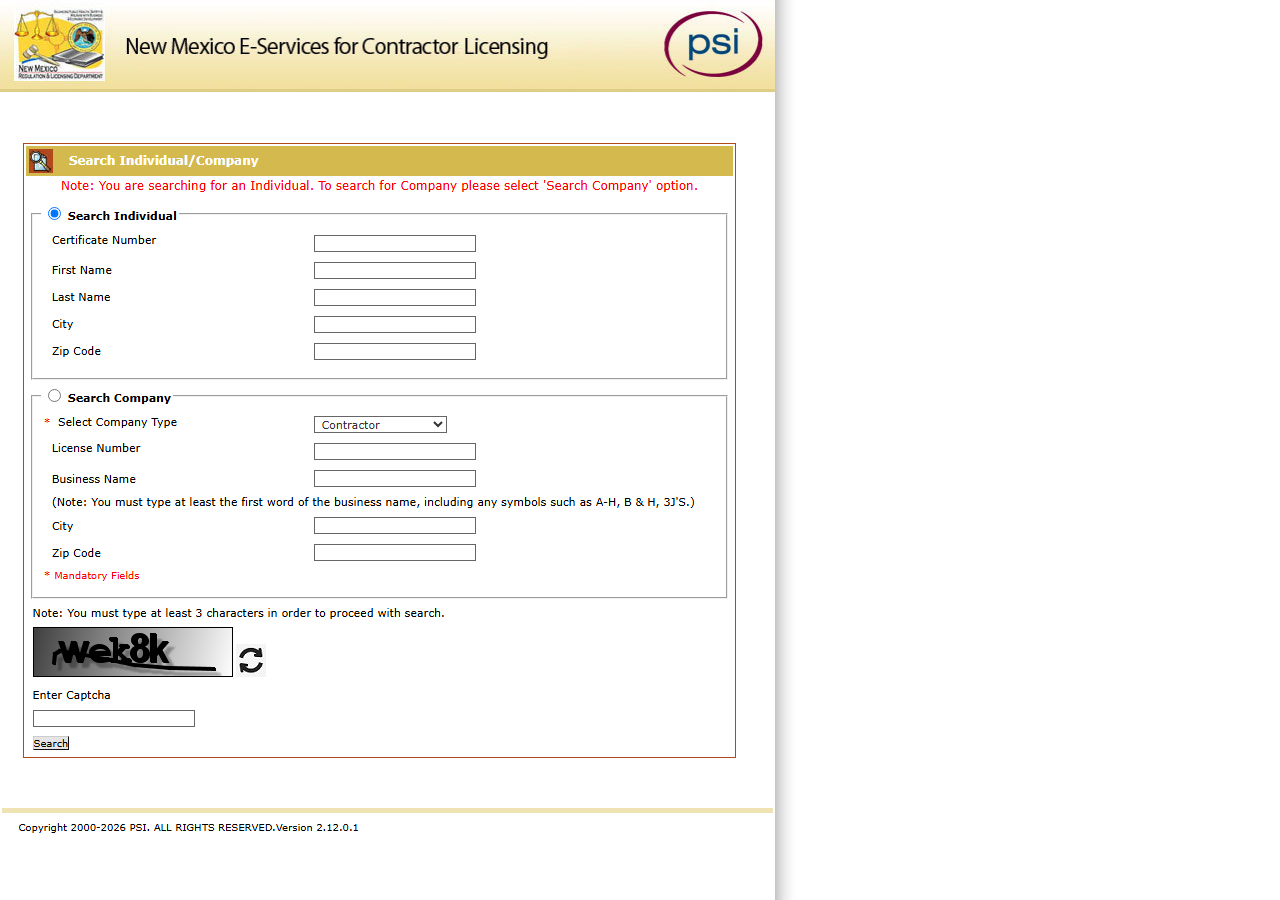
This is the portal, hosted by PSI rather than by the state. Choose Search Company, set the
company type to Contractor, put Albuquerque in the City box — and then read the smudged word
in the image at the bottom of the form and type it into Enter Captcha before it will show you
anything at all.
What comes back is a paginated HTML table with no export button, and a search stops counting at 300 results — while Albuquerque has 3,754 Active contractor licences. So the manual job is not just retyping rows; it’s splitting the city into enough smaller searches to get under the cap, solving a CAPTCHA for each, and copying every row into a spreadsheet by hand. If you’re checking two or three names you already have, the portal is a perfectly good use of five minutes and you should just use it — it’s free and it’s live.
It stops being reasonable the moment you want the list as data. Thousands of rows retyped by hand is thousands of chances to fat-finger a license number, and there’s no way to put any of it on a schedule, so next quarter’s bid list starts from a blank sheet again.
The faster way
New Mexico Contractor License Lookup & List Scraper (NM CID) reads a monthly copy of the whole registry and filters it for you — the whole city, in one run.
{
  "statuses": ["Active"],
  "city": "Albuquerque",
  "maxResults": 5000
}
city filters to contractors whose registered place of business is in Albuquerque, which is the
filter that matters when you’re inviting people to bid — you want firms that are actually there, not
firms that happen to hold a New Mexico license from another state. It’s an exact match on the city
as filed (case doesn’t matter), so Rio Rancho’s 578 Active licences are a separate run. statuses
keeps it to Active licences; leave it out and you also get the cancelled and revoked ones. In the
2026-10-23 sweep this input returns 3,754 rows, every Active licence in the city — which is why
maxResults is raised above its default of 500.
Want a part of town rather than the whole city? zipCode is a prefix, so 87110 narrows to one
ZIP and a shorter prefix takes in every ZIP that starts with it. Bidding a job that starts in March? Add
expiresAfter so a licence that lapses before then never makes the list.
What comes back
{
  "state": "NM",
  "license_number": "396966",
  "business_name": "ADAMS & SMITH, INC.",
  "person_name": null,
  "license_type": "Contractor",
  "status": "Active",
  "issue_date": null,
  "expiration_date": "12/31/2027",
  "city": "LINDON",
  "county": null,
  "address": "1380 W CENTER ST",
  "zip_code": "84042",
  "phone": null,
  "bond_amount": null,
  "bond_company": null,
  "insurance_company": null,
  "matched_by": "statewide",
  "source_url": "https://public.psiexams.com/search.jsp"
}| Field | Example value | Meaning |
|---|---|---|
state | NM | Always ‘NM’ for this actor |
license_number | 396966 | NM CID contractor license number |
status | Active | License status (e.g. Active, Cancelled) |
license_type | Contractor | Always ‘Contractor’ (NM CID’s contractor company category) |
business_name | ADAMS & SMITH, INC. | Licensed business/company name |
address | 1380 W CENTER ST | Principal place of business street address |
business_name plus address and city is your invite list — names and where they are. status
and expiration_date are what make it defensible: an Active license with an expiry date in the
future is a contractor you can put on a bid list without a caveat. license_number is what you
carry into your own records, because it’s the one field that doesn’t change when a firm rebrands.
A city run’s rows read matched_by: "statewide", because no name or number was given.
Note the sample row above: a New Mexico license with a LINDON address and a Utah ZIP. Registered
addresses are as filed, so a city filter is a filter on where the business is registered — El Paso
is the fifth most common city among Active licences, with 362. Worth knowing before you assume every
row is a local shop.
What you’d do with it
Export the dataset to CSV and it’s a bid list you can work from directly: business name, street address, city, ZIP, license number, status, expiry. Drop it into a sheet next to the referral names you started with and the overlap is your shortlist — the referrals that also appear in the registry as active. The ones that don’t appear are the ones worth a phone call before you send anything.
Worth knowing
There is no phone or email in this list. The portal’s search results don’t carry them, so
phone, email, county, bond and insurance come back null on every row; you get a name, a
street address and a licence. If you need to call, that’s a second step.
The data is as of the latest monthly sweep, not live — the run log states which sweep. For a bid list that’s the right trade; for a licence that has to be good on the day you sign, confirm that one number on the portal. If the snapshot is ever missing or more than 45 days old, the run returns one free notice row instead of old data.
Coverage is the Contractor company-license category on public.psiexams.com only: not RLD’s
separate Boards and Commissions Division search, and not individual or journeyman licenses.
source_url points at the search portal because the portal has no per-record URL.
You pay per licence returned, with no per-search fee: $0.004 each from 2026-11-10 (until then $0.01), so the 3,754-row Albuquerque list is $15.02 at the new price. Apify compute is billed separately.
Run it yourself: How to run New Mexico Contractor License Lookup & List Scraper (NM CID) walks the whole thing step by step.
When a name off the list needs checking properly, Verify a New Mexico Contractor by License Number turns a license number into a status and an expiry date. And before you put anyone on a site, the OSHA Violation Risk actor answers a question the licence registry can’t: whether that contractor has an inspection and violation history behind them.
Last updated 2026-10-23