Use case
Find Every CSLB License an Owner Holds by Name
Search California CSLB by a person's name to find every license they're listed on (owner/RMO/RME), across business names.
Say you underwrite contractor liability policies, and an application comes in from a newly formed California LLC. The company has no history worth reading — but the person who signed it does. They have been in the trade for twenty years, which means they have been the qualifier on other licenses, under other business names, possibly ones that lapsed badly. The name on the application is the only thread you have.
Or run the same scenario as a GC: a sub you’re about to hire is a brand-new entity, and you want to know what else the owner has been attached to before you put them on site. Either way the question isn’t “is this license valid” — you can answer that in ten seconds. It’s “what else is this person on”, and that’s the question the registry’s own interface is worst at.
The manual way, and what it costs
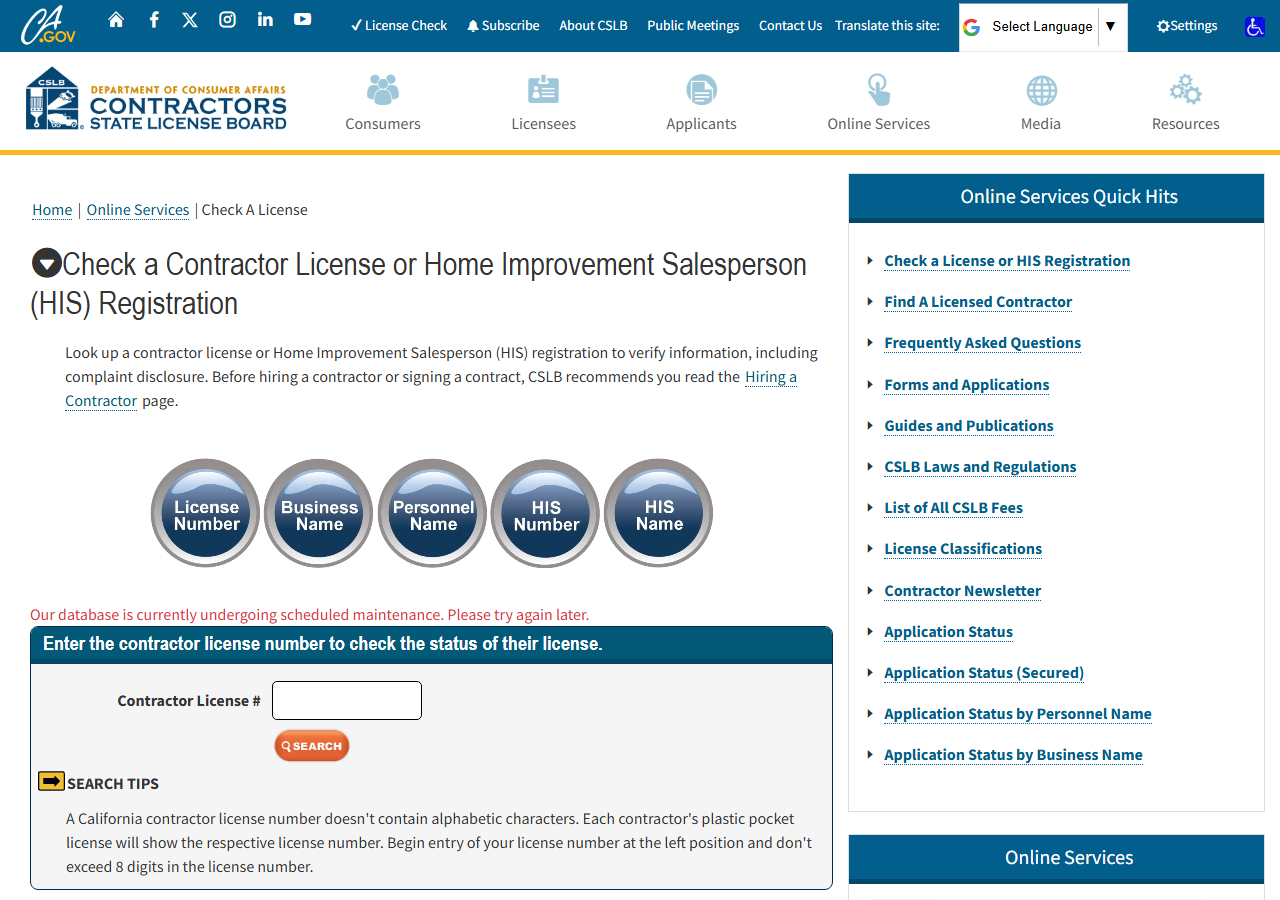
Look at the search page above. Those five buttons are five different searches, and they don’t talk to
each other. License Number and Business Name hit the business index. Personnel Name hits
a separate index of the people attached to licenses — owners, and the RMO/RME qualifiers who make a
license valid. A person can appear in either one, or both: their name might be the business name
(SMITH PLUMBING), or it might appear nowhere in the business name at all and only in the personnel
record.
So the honest manual path to “every license this person is on” is: run the Business Name search, note what comes back, then run the Personnel Name search separately, and merge the two lists by hand while watching for the same license appearing in both. And Personnel Name isn’t one hop — it returns a list of people matching the name, and you have to click into each one to see the licenses they’re associated with. For a distinctive surname that’s a couple of clicks and you should just do it in the browser; it’s free and it works. For a common one it’s a page of near-identical names, each needing its own click-through, and by the time you’ve merged the two indexes by eye you have no artifact — no export, no file, nothing to attach to the underwriting note. CSLB gives you a screen, not a dataset.
The faster way
California Contractor License Lookup & Verify (CSLB) does the same search once and hands back every row at once.
{
  "query": "nguyen",
  "includeDetails": false,
  "maxResults": 25
}
A non-numeric query is searched against both indexes — business names and personnel/owner names
— and the two result sets are unioned and deduped by license number. That is the whole trick: one
search does the merge you’d otherwise do by eye, and each row carries matched_by telling you which
index surfaced it. includeDetails is off here on purpose. This is the reconnaissance pass — you
want to see the shape of the person’s footprint first, and a thin list of license numbers, names,
cities and statuses answers that fast. maxResults: 25 bounds a common surname so a broad first pass
doesn’t run away. Once you know which licenses matter, re-run with the specific license numbers and
includeDetails: true to pull full records. For a person, First Last (Phil Ransome) or
Last, First with the comma both work.
What comes back
{
  "license_number": "22726",
  "business_name": "RANSOME COMPANY",
  "name_type": "DBA",
  "matched_by": "business_name",
  "status": "This license is current and active.",
  "city": "SAN LEANDRO",
  "has_detail": true,
  "business_type": "Corporation",
  "address": "1933 WILLIAMS STREET",
  "state": "CA",
  "zip_code": "94577",
  "phone": "(510) 686-9900",
  "issue_date": "07/01/1932",
  "expiration_date": "10/31/2027",
  "classifications": [
    "A",
    "C10"
  ],
  "surety_company": "HARCO NATIONAL INSURANCE COMPANY",
  "bond_number": "354811",
  "bond_amount": "25,000",
  "workers_comp_type": "Insurance",
  "workers_comp_company": "TRAVELERS PROPERTY CASUALTY COMPANY OF AMERICA",
  "source_url": "https://www.cslb.ca.gov/onlineservices/checklicenseII/LicenseDetail.aspx?LicNum=22726"
}| Field | Example value | Meaning |
|---|---|---|
license_number | 22726 | CSLB license number |
business_name | RANSOME COMPANY | Licensed business name |
name_type | DBA | How the name is held (e.g. DBA) — from name searches |
matched_by | business_name | Which search surfaced this match: ‘license_number’ or ‘business_name’ |
status | This license is current and active. | License status (e.g. ‘Active’, ‘Expired’, or the detail status sentence) |
city | SAN LEANDRO | Business city |
matched_by is the column that closes the loop, and it’s the one you can’t get by hand without doing
the merge yourself: it says whether this license surfaced because the business matched the name or
because a person on it did. A row where the business name is nothing like your applicant’s name but
matched_by still ties them to it is exactly the finding you were looking for. license_number is
the handle for everything after — it’s what you feed back in to pull the full record. status on the
thin pass is enough to spot the ones worth a second look: an expired or revoked license attached to
the same person as a brand-new LLC is the pattern you’re underwriting against. name_type tells you
how the name is held on the record — a DBA, for instance — which is often why the same person shows
up under a name you didn’t recognise.
What you’d do with it
You get a list of license numbers tied to one person, with the ones that surfaced through the
personnel index flagged. Take the interesting ones — the expired, the revoked, the ones under an
unfamiliar business name — and re-run the actor on those license numbers with includeDetails: true
to pull entity type, issue and expiry dates, classifications, bond and workers’ comp. That’s your
attachment: a structured record of every license the applicant is on, each row carrying a
source_url back to the official CSLB page, so nothing in the underwriting note is something a
reader has to take your word for.
Worth knowing
Be precise about what a personnel match means: it returns the licenses a person is currently associated with in CSLB’s personnel index. It is not a lifetime history, and it is not a cross-reference of every entity a human being has ever touched — someone who left a license years ago may simply not be listed on it any more. It’s also California only, the CSLB public registry (public record under Business & Professions Code §7000 et seq.), and it reflects the live registry at lookup time. Common names are the real limit: “Nguyen” or “Smith” will return many distinct people, and the actor can’t tell you which one is yours. Runs are bounded (default 50 results) — narrow the name, don’t widen the cap. And this adds no personal data of its own: it’s the professional-license record as CSLB publishes it, no PII enrichment on top.
Run it yourself: How to run California Contractor License Lookup & Verify (CSLB) walks the whole thing step by step.
Once you’ve narrowed to a specific license, Verify a California Contractor by License Number is the follow-up pass that turns a number into a full compliance record. And if the person you’re chasing may hold licenses outside California, Multi-State Contractor & Trade License Lookup checks the same contractor across several states in one run.
Last updated 2026-07-13