Use case
Watch Resy restaurants and flag new tables
Check a list of Resy restaurants for a table for 2 over the next 14 days, 7pm to 9:30pm, and flag only the tables that opened since the last run.
Say you’ve promised someone dinner at Le Gratin, Daniel Boulud’s Lyonnais bistro on Beekman Street, some evening in the next two weeks, for 2, between 7pm and 9:30pm. The good times go fast and come back at random when someone cancels. You could open Resy every hour and look, or you could have a run do it every 15 minutes and tell you only when a table you’d take appears.
The manual way, and what it costs
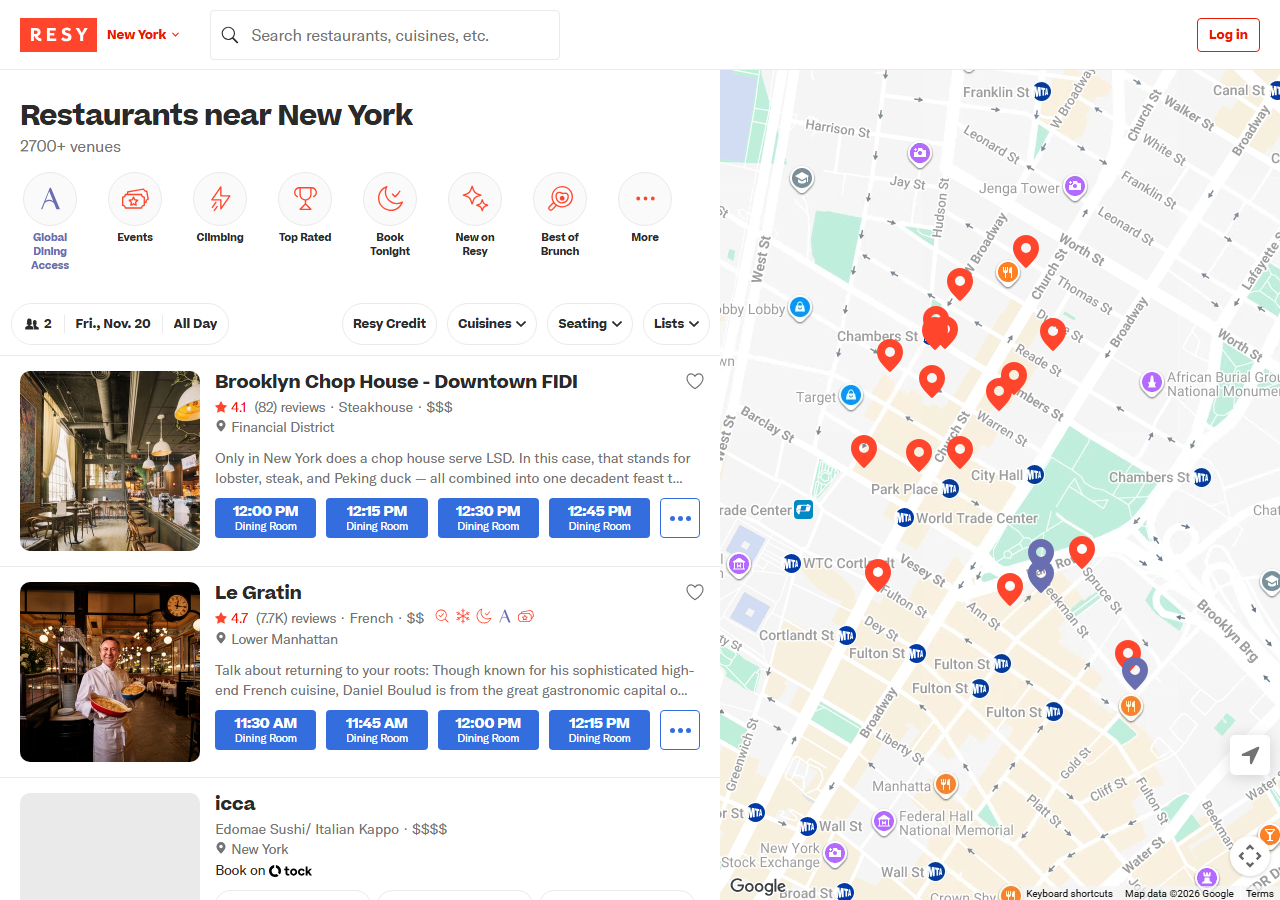
Resy’s own page is the manual way, and for one restaurant on one night it’s the right tool: pick the date and party size and the times are right there. Resy also has its own Notify button in the app for a restaurant you’re waiting on. The manual way stops working when you want several restaurants or a run of dates. Two weeks of evenings at one restaurant is 14 date changes per look, and a cancellation that appears and is taken between two looks never reaches you.
The faster way
Resy Availability Scraper & Table Alert Monitor does the same search once and hands back every row at once.
{
  "mode": "watch",
  "venues": [
    "https://resy.com/cities/new-york-ny/venues/le-gratin"
  ],
  "daysAhead": 14,
  "partySize": 2,
  "timeFrom": "19:00",
  "timeTo": "21:30",
  "onlyNew": true
}
daysAhead: 14 checks today and the 13 days after it, and because the range is relative, the saved task never needs editing. timeFrom and timeTo keep only the 7pm to 9:30pm tables, so a free lunch slot doesn’t set off the alert. onlyNew is what makes it an alert: the actor remembers which tables were open on this watch’s previous run and marks the ones that appeared since. Add more restaurants to venues and they’re all checked in the same run. For a range, the actor reads each restaurant’s Resy calendar once and opens only the days that have tables.
What comes back
{
  "venue_id": 60029,
  "name": "Le Gratin",
  "resy_url": "https://resy.com/cities/new-york-ny/venues/le-gratin?date=2026-11-10&seats=4",
  "date": "2026-11-10",
  "party_size": 4,
  "available": true,
  "slot_count": 11,
  "first_slot": "19:00",
  "last_slot": "21:30",
  "slots": [
    {
      "time": "19:00",
      "end_time": "21:15",
      "seating": "Dining Room",
      "min_party": 3,
      "max_party": 4,
      "table_minutes": 135,
      "deposit_required": false,
      "deposit_fee": null,
      "cancellation_fee": null,
      "cancel_cutoff_hours": null
    }
  ],
  "new_slots": [
    {
      "time": "19:00",
      "end_time": "21:15",
      "seating": "Dining Room",
      "min_party": 3,
      "max_party": 4,
      "table_minutes": 135,
      "deposit_required": false,
      "deposit_fee": null,
      "cancellation_fee": null,
      "cancel_cutoff_hours": null
    }
  ],
  "has_new_slots": true,
  "calendar_status": "available",
  "cuisine": "French",
  "price_range": 2,
  "rating": 4.65,
  "rating_count": 7721,
  "neighborhood": "Lower Manhattan",
  "city": "New York",
  "region": "NY",
  "country": "United States",
  "latitude": 40.711596,
  "longitude": -74.00685,
  "phone": "+12125979020",
  "address": "5 Beekman St",
  "postal_code": "10038",
  "website": "https://www.legratinnyc.com/",
  "instagram": "https://www.instagram.com/legratinnyc/",
  "google_place_id": "ChIJj4fN7HBbwokRCB5xca3KF1E",
  "query": "https://resy.com/cities/new-york-ny/venues/le-gratin",
  "source_url": "https://resy.com/cities/new-york-ny/venues/le-gratin?date=2026-11-10&seats=4"
}| Field | Example value | Meaning |
|---|---|---|
name | Le Gratin | The restaurant’s name on Resy |
date | 2026-11-10 | The day checked |
party_size | 4 | Guests the tables are for |
available | True | True when at least one table is open in your time window |
slot_count | 11 | Number of open times in your window |
first_slot | 19:00 | Earliest open time, HH:MM |
That row is from a real run on 2026-11-04, for 4 people on 10 November: 11 open times between 19:00 and 21:30, each held for 135 minutes, no deposit. The two fields that close the loop are has_new_slots, the yes/no your alert fires on, and resy_url, which opens that restaurant on Resy for that date and party size so you can book in one tap.
What you’d do with it
Save the input as an Apify task and give it a schedule, every 15 minutes for example. Then point an Apify webhook, or an n8n, Make or Zapier step, at the run’s dataset and send a message (Slack, Telegram, email, a text) for each row where has_new_slots is true, with name, date, the new_slots times and resy_url in it. Watching one restaurant for 14 days is 14 checks, $0.014 a run, so a 15-minute schedule costs about $1.34 a day. Narrow the days or widen the interval to spend less.
Worth knowing
It reports tables and never books one. Availability changes by the minute, so a table can be gone by the time you open the link, and a 15-minute schedule will miss a table that opens and is taken inside that window. It only covers restaurants that take reservations on Resy, not OpenTable, Tock or walk-ins. If Resy refuses or doesn’t answer, the run says so in a free blocked row rather than reporting “no new tables”, so make your alert treat that row as “unknown”, not as all-clear.
Run it yourself: How to run Resy Availability Scraper & Table Alert Monitor walks the whole thing step by step.
Not tied to one restaurant? Every Resy restaurant in New York with open tables tonight lists a whole city’s open tables instead. Booking a trip around the dinner? Google Hotels Scraper prices the hotels nearby for the same nights.
Last updated 2026-11-04