Use case
Match a business list to Google Maps place IDs
Match messy business names and addresses to their Google Maps place: place ID, clean address, coordinates, phone, website and rating.
Say you run RevOps for a company that sells espresso machines to cafés and restaurants, and the sales team is about to split territories. Before anyone draws a line on a map you need the account list cleaned: reps have typed the same account three ways, half the rows have no phone, and some are just “starbucks lafayette ca 94549”. You cannot dedupe on a name that is spelled differently in every row. You can dedupe on Google’s place ID, and the Google Maps Place Matcher gives you one per business it can match, along with Google’s own spelling of the name and address.
The manual way, and what it costs
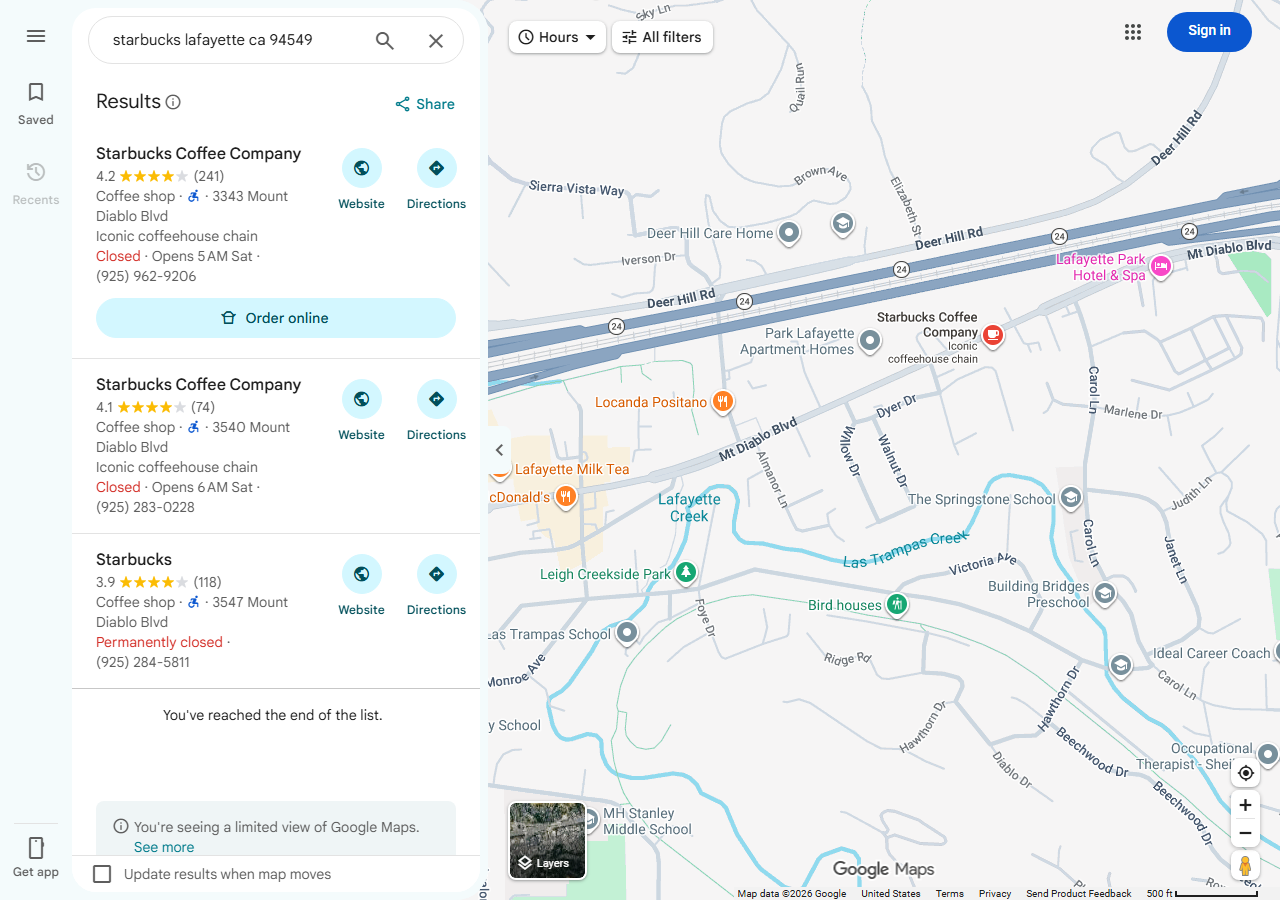
The free way is one Google Maps search per row. Type the line, open the right result, copy the address and phone back into the sheet, then move on to the next row. That is minutes per row, and a search result has no button that sends it to a sheet, so every value is copy-paste. You also have to judge each answer yourself: Google offers its closest guess even when the house number you typed is wrong, which is how a list fills up with the business next door. For a handful of accounts, do it by hand; it costs nothing and you will look at each place properly. Past a few dozen rows the copying becomes the job, and you still end up without the place ID to dedupe on.
The faster way
Google Maps Place Matcher: Business Lookup by Name & Address does the same search once and hands back every row at once.
{
  "queries": [
    "Blue Bottle Coffee 480 9th St Oakland",
    "starbucks lafayette ca 94549",
    "Joe's Pizza 7 Carmine St New York",
    "Franklin Barbecue Austin TX"
  ]
}
These 4 lines are the shapes a CRM export holds: a name with its street address, a lowercased chain
name with a city and ZIP, a name with a street in New York, and a name with only a city and state.
None of them needs cleaning first. If your export has its own account IDs, send it as rows
instead, for example {"id": "crm-17", "name": "Tartine Bakery", "city": "San Francisco", "state": "CA"}, which in our test matched 600 Guerrero St and came back with input_id: "crm-17".
What comes back
{
  "input": "Blue Bottle Coffee 480 9th St Oakland",
  "input_id": null,
  "place_id": "ChIJLRIbILeAj4ARyWoMWFQmkSY",
  "name": "Blue Bottle Coffee",
  "address": "480 9th St, Oakland, CA 94607",
  "street": "480 9th St",
  "city": "Oakland",
  "state": "CA",
  "zip_code": "94607",
  "latitude": 37.8012466,
  "longitude": -122.2739477,
  "phone": "(510) 653-3394",
  "website": "https://bluebottlecoffee.com/us/eng/northern-california-cafes?utm_source=google&utm_medium=organic&utm_campaign=cafe_business_listing_norcal",
  "rating": 4.4,
  "review_count": 396,
  "categories": [
    "Coffee shop"
  ],
  "google_maps_url": "https://www.google.com/maps/search/?api=1&query=Blue%20Bottle%20Coffee&query_place_id=ChIJLRIbILeAj4ARyWoMWFQmkSY",
  "matched_by": "name + address",
  "confidence": "high",
  "other_matches": [],
  "source_url": "https://www.google.com/maps/search/?api=1&query=Blue%20Bottle%20Coffee&query_place_id=ChIJLRIbILeAj4ARyWoMWFQmkSY"
}| Field | Example value | Meaning |
|---|---|---|
input | Blue Bottle Coffee 480 9th St Oakland | What was looked up (your line, or a row’s fields joined) |
input_id | — | The id you gave the row, echoed back |
place_id | ChIJLRIbILeAj4ARyWoMWFQmkSY | Google’s own place ID |
name | Blue Bottle Coffee | The place’s name on Google Maps |
address | 480 9th St, Oakland, CA 94607 | Full address as Google Maps writes it |
street | 480 9th St | Street line(s) |
place_id closes the loop: two CRM rows with the same place ID are the same account, however the
reps spelled them. phone fills the gaps, here (510) 653-3394 for the Oakland café. Then read
confidence. The Lafayette Starbucks line matched 3343 Mount Diablo Blvd at “medium”, because
Google answered with more than one Starbucks; the one at 3540 Mount Diablo Blvd is in
other_matches. A chain with two stores on one street is exactly where a rep should confirm which
one the account is.
What you’d do with it
Export the dataset to CSV and join it back to the CRM on input_id (or on input for plain lines).
Add place_id as a field on the account, merge accounts that share one, and fill empty phone and
website fields from Google’s values. Sort the “medium” and “low” rows into a short review queue for
the reps. The free no-match rows are the other queue: in our 10-line test there were 3, and each
named what Google offered instead, so fixing one is usually a matter of correcting a house number.
Next quarter, match the new accounts only and join on the place IDs you already have.
Worth knowing
It was built and tested on US businesses and addresses. Outside the US a match keeps only its full address line, with no state or ZIP split out. The data is what Google Maps shows at the time of the run, so a place with no phone or website on Google Maps has none here. The match check compares numbers and name words; it can still pass a place at the same house number with a similar name, and it refuses a business whose Google Maps name shares too few words with the name you sent (send the name as Google Maps writes it, or the address alone). You cannot send a place ID to look up a place you already have the ID of.
The price is $0.0015 per matched input, so 1,000 matches cost $1.50, and no-match rows are free.
Run it yourself: How to run Google Maps Place Matcher: Business Lookup by Name & Address walks the whole thing step by step.
If the next step is outreach by email, the Business Email, Phone & Contact Details Scraper takes the matched websites and returns each business’s email and social links.
Last updated 2026-11-06