How-to
How to run Illinois Roofing Contractor Directory & Leads Scraper (IDFPR)
Step-by-step: the exact input, what each field does, and the rows that come back from IDFPR (Socrata).
You want a list of licensed roofing contractors in an Illinois county — Cook, DuPage, Kane — as rows you can sort, filter and hand to a sales team or a compliance review. Before you read any further, three things about Illinois that decide whether this actor is any use to you at all. Illinois licenses no statewide general contractor: roofing is the only contractor trade IDFPR licenses at the state level, so roofing contractors are the only contractor-like rows in this data — electrical, plumbing, HVAC and general construction are licensed by municipalities, and none of them are here. The dataset publishes no street address and no phone number. And a meaningful chunk of the rows carry a blank or out-of-state county value. If your plan was a call list, the phone numbers are not in this source and no scraper can invent them; what you get is a named, license-checked roster with a city and a ZIP. The manual alternative is the state’s own open-data portal, where you can page through the same rows in a browser and copy them out by hand, a page at a time, with no county-scoped export button. That is free, and for one small county it is a perfectly reasonable afternoon.
What you’ll need
Nothing but an Apify account. The actor talks to IDFPR (Socrata) directly.
No API key, no CAPTCHA-solving credentials, no proxy, no token of any kind. This is a plain public JSON API on data.illinois.gov and it answers ordinary datacenter requests. The difficulty here is not in the defences — there are none to speak of — it is in what the data does and does not contain.
Step 1 — Open the actor
Open Illinois Roofing Contractor Directory & Leads Scraper (IDFPR) on the Apify Store and press Try for free. The actor’s own page on this site lists its live health and pricing.
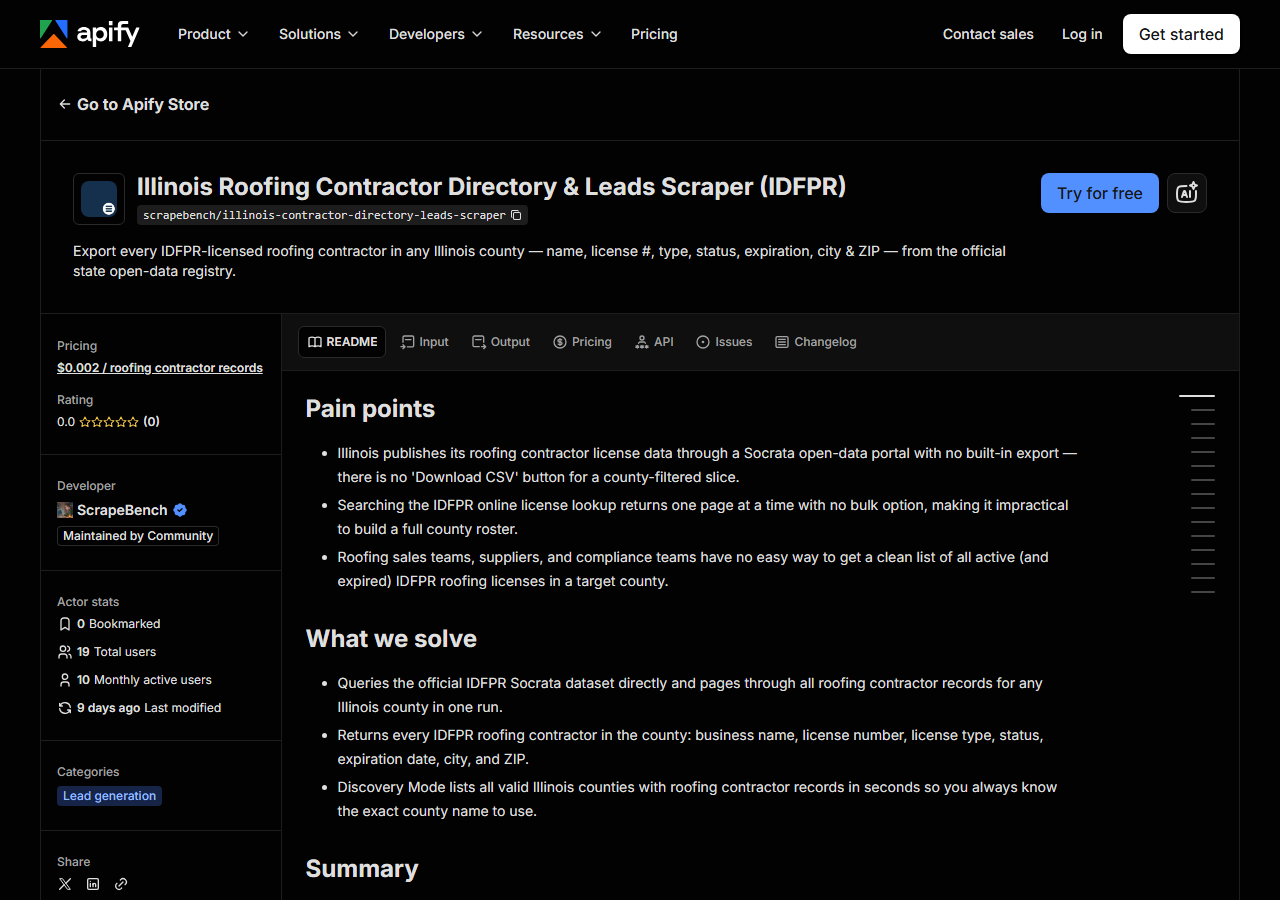
Step 2 — Fill in the input
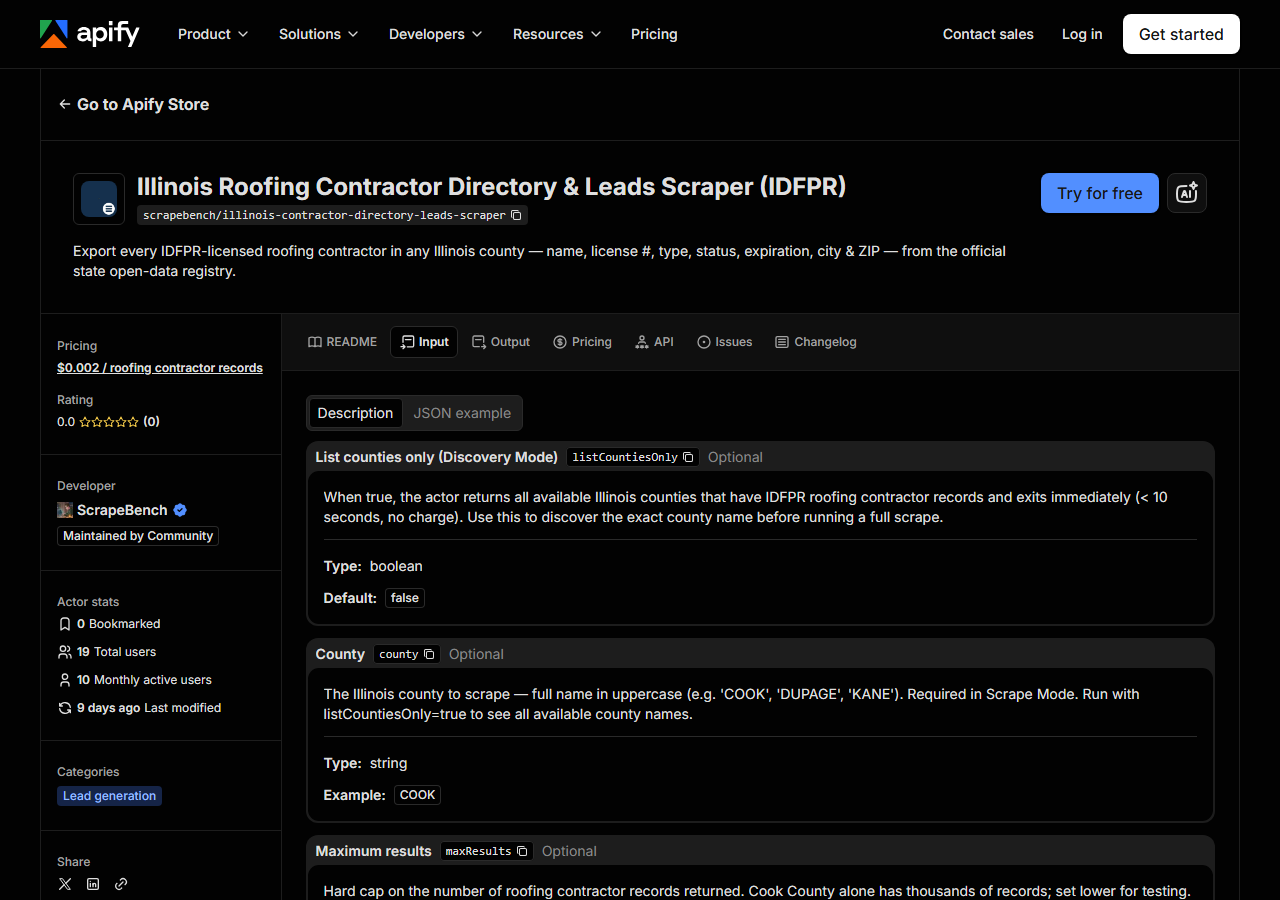
| Field | Type | Required | What it does |
|---|---|---|---|
listCountiesOnly | boolean | no | When true, the actor returns all available Illinois counties that have IDFPR roofing contractor records and exits immediately (< 10 seconds, no charge). Use this to discover… |
county | string | no | The Illinois county to scrape (e.g. ‘Cook’, ‘DuPage’, ‘St. Clair’). Case, spacing and a trailing ‘County’ do not matter. If it is missing or matches no Illinois county, the run returns the free county list instead of failing. |
maxResults | integer | no | Hard cap on the number of roofing contractor records returned. Cook County alone has thousands of records; set lower for testing. Default 500. (default 500) |
One field decides what you get: county. The dataset spells counties its own way — DUPAGE,
SAINT CLAIR, LA SALLE with the space — but you don’t have to: case, punctuation, spacing and a
trailing “County” are folded before matching, so DuPage, St. Clair, LaSalle and Cook County
all land on the right one. A name that still matches no Illinois county doesn’t fail the run and
doesn’t return an empty dataset either: you get the county list back, free, so you can pick the exact
name and re-run. Leaving county empty does the same thing. If you’d rather see the list first, tick Discovery Mode (listCountiesOnly) and run it first: it skips the scrape entirely
and returns the county names that actually have roofing contractor records, which is the list you
should be picking from anyway. It finishes in seconds. Note what Discovery Mode is doing under the
hood — it is filtering the raw county values against Illinois’ canonical 102 counties, because the
raw column is dirty. Rows with a blank county, or a county belonging to another state, exist in the
source and are dropped. They are also unreachable by a county scrape, so accept that a county-by-
county sweep of all 102 counties will not add up to every row in the dataset.
maxResults is a cap, not a filter — the first N rows in license-number order, default 500. Cook
County has thousands of records, so leaving the default in place on Cook gives you a truncated slice,
not the county. Raise it when you want the whole roster; lower it when you’re just looking.
A working input:
{
  "county": "COOK",
  "maxResults": 500
}
Step 3 — Run it
Press Start. Rows are pushed to the dataset as they’re found, so the run log fills in as it works.
A healthy run is quick and boring. The actor asks the Socrata API for the county’s roofing-contractor
rows a thousand at a time and stops when the county is exhausted or maxResults is hit — there is no
browser, no form to drive, no page-by-page crawl, so a run is a handful of HTTP requests. Run times
and row counts aren’t measured here, so they aren’t quoted; a dense county like Cook obviously
returns far more than a rural one, and you’ll see the real number in the log almost immediately.
If a run comes back empty, it is nearly always the county, not the actor: a county with no roofing
contractor records on file returns zero rows. A county name that matches nothing is easy to spot
instead — that run comes back with county_name rows, the county list, rather than contractor rows.
Take a name straight off that list and try again. Zero rows means zero charges: the actor charges per row it pushes, so an empty run costs you nothing but
the platform compute.
Step 4 — Read the output
Each run returns a labelled table, not raw JSON:
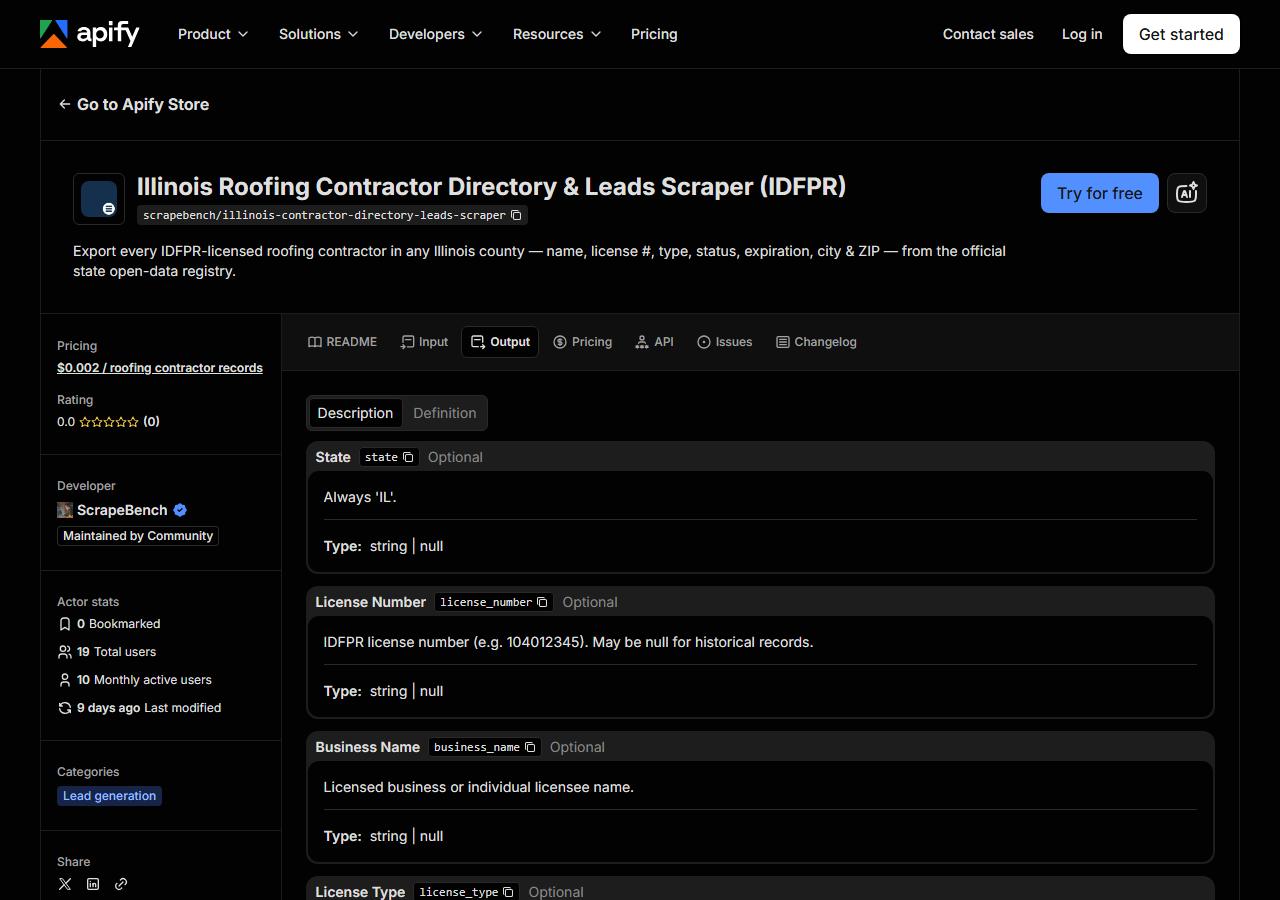
Every row looks like this — a real row from a real run:
{
  "state": "IL",
  "license_number": "104012345",
  "business_name": "CHICAGO SKYLINE ROOFING INC",
  "license_type": "LICENSED ROOFING CONTRACTOR",
  "status": "ACTIVE",
  "issue_date": "03/15/2010",
  "expiration_date": "06/30/2025",
  "city": "CHICAGO",
  "county": "COOK",
  "address": null,
  "zip_code": "60601",
  "phone": null,
  "person_name": null,
  "bond_amount": null,
  "bond_company": null,
  "insurance_company": null,
  "matched_by": "county_directory",
  "source_url": "https://data.illinois.gov/d/pzzh-kp68"
}| Field | Example value | Meaning |
|---|---|---|
state | IL | Always ‘IL’ |
license_number | 104012345 | IDFPR license number (e.g. 104012345). May be null for historical/deceased records. |
business_name | CHICAGO SKYLINE ROOFING INC | Licensed business or individual licensee name |
license_type | LICENSED ROOFING CONTRACTOR | IDFPR license description (e.g. LICENSED ROOFING CONTRACTOR or QUALIFYING PARTY ROOFING CONTRACTOR) |
status | ACTIVE | License status (ACTIVE, NOT RENEWED, CANCELLED, DECEASED) |
issue_date | 03/15/2010 | Original issue date (MM/DD/YYYY) |
expiration_date | 06/30/2025 | License expiration date (MM/DD/YYYY) |
city | CHICAGO | Licensee city |
The columns people actually came for are business_name, license_number, status and
expiration_date — who they are, that they’re real, and whether the licence is still good. city
and zip_code are the only geography you get below county level.
Now the nulls, and they matter more here than on most actors. address and phone are always
null. Not sometimes, not “null for some records” — the IDFPR dataset does not publish a street
address or a phone number at all, and those two fields exist in the output only to keep the row shape
identical to the other contractor actors in this suite. If you need to dial these contractors, this
run gives you a verified name, a city and a ZIP, and you will have to source the number elsewhere.
bond_amount, bond_company and insurance_company are null for the same reason. person_name
is filled in only for individual licensees — for a company it is null, and the name you want is in
business_name. license_number itself can be null on old, historical rows.
The rest is formatting. Names arrive shouted in capitals as the state stores them, dates are
MM/DD/YYYY strings rather than real dates, and status is a small vocabulary — ACTIVE,
NOT RENEWED, CANCELLED, DECEASED — which means a raw county pull is a historical roster, not a
list of businesses currently trading. Filter on status before you treat it as a prospect list.
license_type distinguishes LICENSED ROOFING CONTRACTOR from QUALIFYING PARTY ROOFING CONTRACTOR;
the qualifying party is the individual who qualifies a firm, so a county pull mixes firms and people
unless you filter that column too.
Step 5 — Export it
Open the Dataset tab and export to CSV, JSON, or Excel — or pull the same rows from the API, which is what you want if this is going to run on a schedule.
What it costs
$0.002 per result row. A run that returns 500 Cook County roofing contractors costs $1.00; a small rural county with forty licensees costs eight cents. You are charged per row the actor pushes, so an empty run is free, and Discovery Mode — which returns nothing but county names, a hundred rows at the very most — is the cheap way to avoid paying for a wrong-county run. Apify’s own platform usage (compute) is billed separately under your plan, on top of the per-result fee.
Be clear-eyed about the comparison. The underlying data is public and free, and if you want one county once, the state’s portal will show it to you in a browser for nothing. The per-result fee buys you the county-scoped slice as clean typed rows, on a schedule, addressable from an API, with the dirty county values already dropped — not access to something you couldn’t otherwise reach.
Where the data comes from
This reads IDFPR (Socrata) directly. The target is Socrata SODA JSON API (data.illinois.gov, IDFPR licences) - filtered server-side with SoQL. Every night a canary runs this actor against that live source and diffs the result against a frozen fixture — what “verified” means.
IDFPR publishes its licence file on data.illinois.gov as a Socrata dataset, and Socrata exposes a SODA JSON endpoint with a SQL-like query language, so the fetch itself is genuinely easy: the actor filters server-side with SoQL for the roofing-contractor licence type and the county you asked for, pages a thousand rows at a time, and backs off if the shared unauthenticated throttle pushes back. There is no anti-bot wall to beat and this guide will not pretend otherwise. The annoying part is everything after the fetch. One file holds every IDFPR profession, so the roofing rows have to be cut out of it by licence type; the county column carries blanks and out-of-state values that have to be checked against the real 102 Illinois counties; and half the fields a lead-gen buyer expects simply aren’t in the file. The nightly canary watches for the day the state renames a column or changes that licence-type string underneath all of it.
See it used
Build a Cook County Roofing Contractor List turns the Cook County roofing roster into an outreach list.
If your target state is California rather than Illinois, California Contractor Directory by Trade & County (CSLB) is the closest equivalent — and a far richer one, because CSLB publishes the street address and the phone number that IDFPR withholds, across every trade rather than roofing alone. And if you already know which contractor you care about and just need the licence checked, Multi-State Contractor & Trade License Lookup verifies a named licensee across states instead of building a roster from one.
Last updated 2026-07-13